

The most powerful in-game handling editor for FiveM. Tune every aspect of your vehicle's physics in real time - no server restarts, no file editing, no guesswork. See the results instantly as you drive.
Open the sleek in-game panel with F7, and start tuning. Every change applies instantly to the vehicle you're sitting in - adjust a slider and feel the difference immediately. Supports 42 editable handling fields across 8 categories:
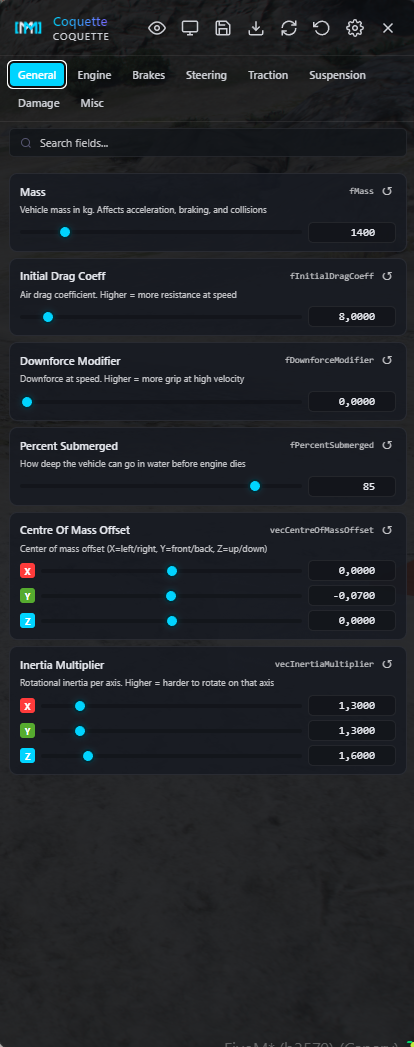
General
Mass, drag, downforce, submersion, center of mass offset, inertia multiplier
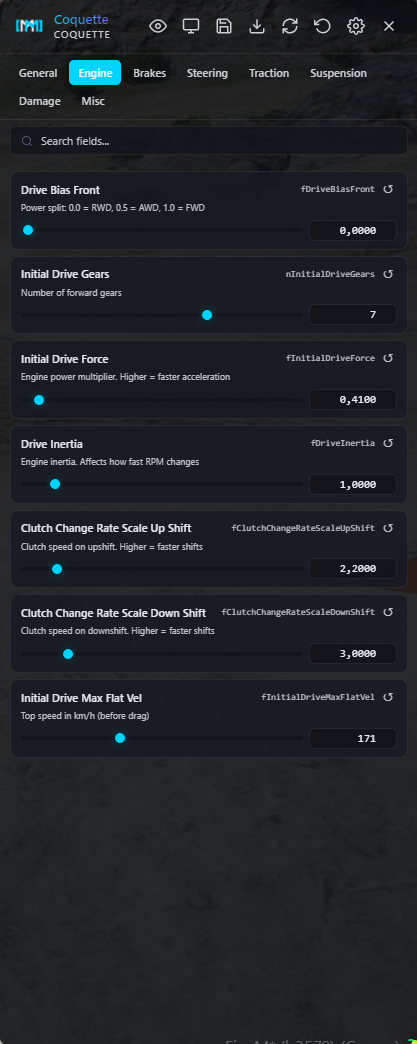
Engine & Transmission
Drive bias, gear count, drive force, drive inertia, clutch rates, top speed
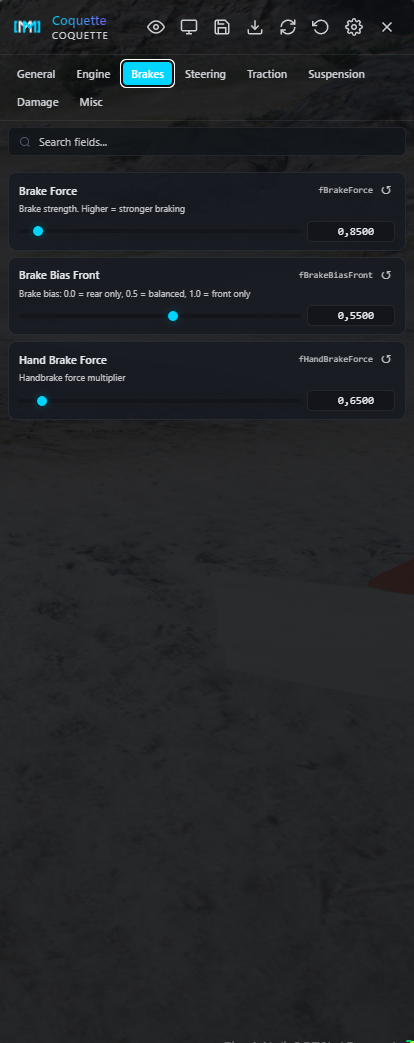
Brakes
Brake force, brake bias, handbrake force
Steering
Steering lock angle
Traction
Traction curves, lateral grip, spring delta, camber stiffness, traction bias & loss
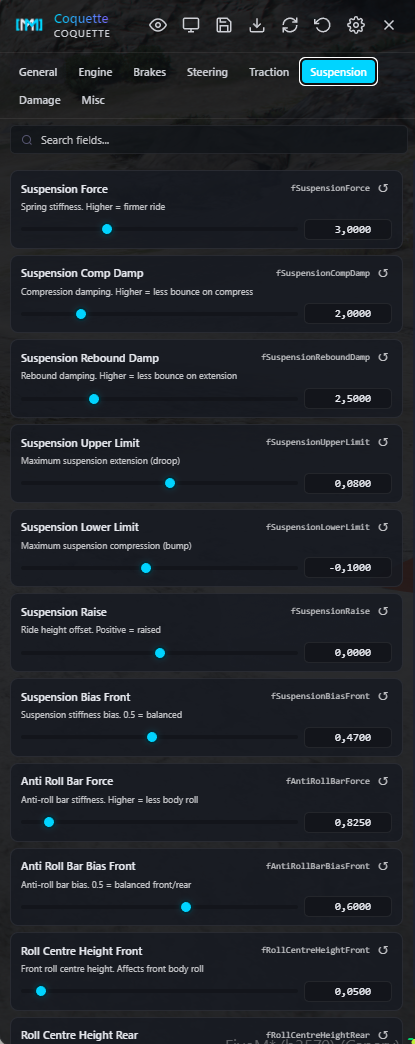
Suspension
Force, compression/rebound damping, upper/lower limits, ride height, anti-roll bar, roll centre heights
Damage
Collision, weapon, deformation, and engine damage multipliers
Misc
Fuel tank, oil volume, seat offsets, monetary value
Every field has a slider + number input, instant reset button, and shows when it's been modified from the original value.
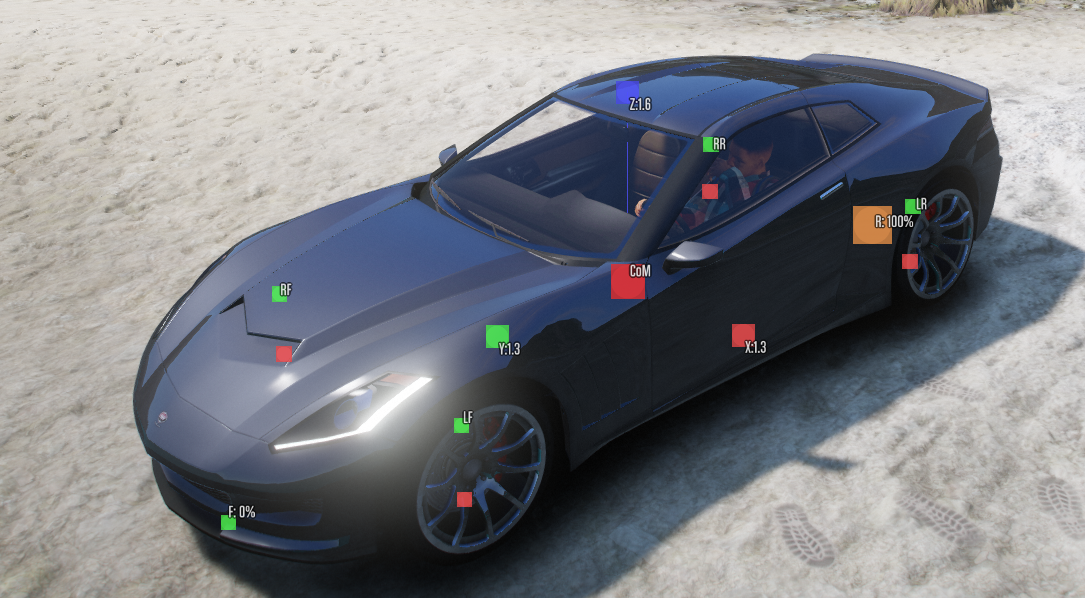
Toggle the built-in visualization overlay to see your physics data rendered on top of the vehicle model in real time:
Center of Mass
Red dot showing exact CoM position
Inertia Axes
Color-coded X/Y/Z axis lines scaled by inertia multiplier
Suspension Range
Green/red lines at each wheel showing upper limit, lower limit, and ride height
Drive Bias
Front/rear power distribution indicators with percentage labels
All visualization elements can be individually toggled on or off in Settings.
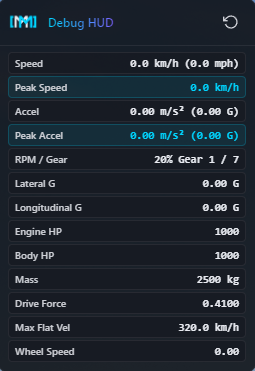
A dedicated real-time telemetry panel that stays open even when the editor is closed - perfect for testing runs:
Speed (km/h) with peak speed tracking
Acceleration (m/s²) with peak acceleration tracking
RPM & current gear
Lateral & longitudinal G-forces
Engine & body health
Mass, drive force, max velocity
Wheel speed
Reset peaks with one click. Choose exactly which fields to display.
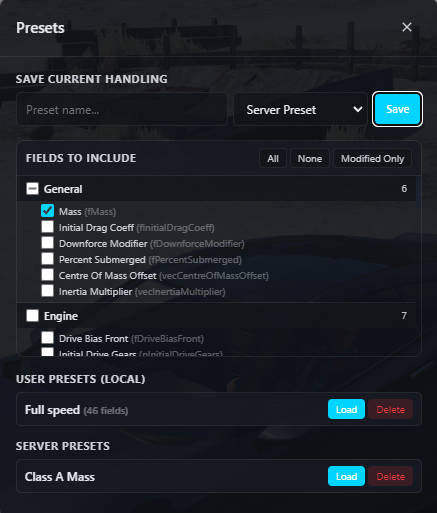
Save your work and share it across your team:
User Presets > Saved locally per player, instant load/delete
Server Presets > Shared across all players with permission, stored server-side
Field Picker > Choose exactly which fields to include in each preset. Quick actions: Select All, Select None, or Modified Only
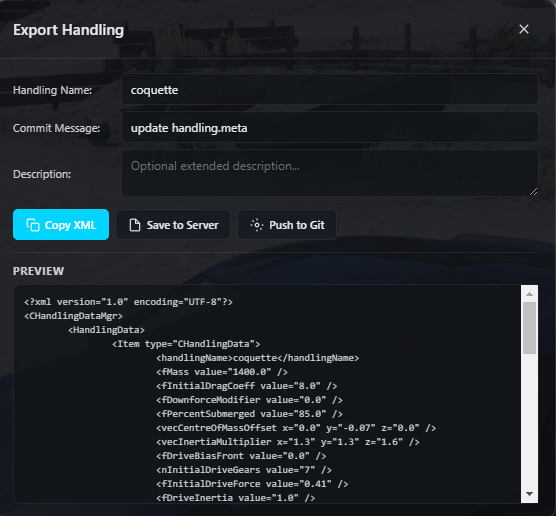
Copy XML
One-click copy of a valid handling.meta to clipboard
Save to Server
Write the handling.meta file directly to your server
The standout feature: push your handling changes directly to your GitHub or GitLab repository from inside the game.
Smart patching
Only the fields you changed are updated in the existing file. Flags, comments, AIHandling, SubHandlingData, and formatting are all preserved untouched
No new files
Finds and patches the existing file by matching the vehicle's ``
Custom commit messages
with optional description
Supports self-hosted GitLab
Pull the latest handling values from your repo back into the editor without restarting the server. Perfect for team workflows.
Dark transparent theme
See the game world through the panel
Draggable panels
Reposition the editor and debug HUD anywhere on screen; positions saved per player
Smooth animations > Slide-in panels, hover effects, toast notifications
Scrollable categories > Even the largest categories scroll smoothly
Panel fades when not in use > Stays out of your way while testing
Drive while editing > WASD controls pass through to the vehicle. Hold right-click outside the panel for free camera
Every feature is permission-gated so you control exactly who can do what:
handling.use
Open editor, edit values, load presets, visualize, refresh from Githandling.server_presets
Save & delete server-wide presets
handling.save_file
Save handling.meta to server filesystem
handling.github
Push to GitHub / GitLab
Git tokens are server-side only > never sent to any client
All server actions validate ACE permissions before executing
Add the resource to your server
Set ACE permissions in server.cfg
(Optional) Add your Git token in config.lua
Enter a vehicle, press F7, and start tuning
42 handling fields | 8 categories | Real-time visualization | Debug telemetry | User & server presets | GitHub & GitLab integration | ACE permissions | Zero dependencies
This asset is encrypted with the FiveM Escrow asset encryption system.
TAGS: FiveM,Standalone, New


The most powerful in-game handling editor for FiveM. Tune every aspect of your vehicle's physics in real time - no server restarts, no file editing, no guesswork. See the results instantly as you drive.
Open the sleek in-game panel with F7, and start tuning. Every change applies instantly to the vehicle you're sitting in - adjust a slider and feel the difference immediately. Supports 42 editable handling fields across 8 categories:
General
Mass, drag, downforce, submersion, center of mass offset, inertia multiplier
Engine & Transmission
Drive bias, gear count, drive force, drive inertia, clutch rates, top speed
Brakes
Brake force, brake bias, handbrake force
Steering
Steering lock angle
Traction
Traction curves, lateral grip, spring delta, camber stiffness, traction bias & loss
Suspension
Force, compression/rebound damping, upper/lower limits, ride height, anti-roll bar, roll centre heights
Damage
Collision, weapon, deformation, and engine damage multipliers
Misc
Fuel tank, oil volume, seat offsets, monetary value
Every field has a slider + number input, instant reset button, and shows when it's been modified from the original value.
Toggle the built-in visualization overlay to see your physics data rendered on top of the vehicle model in real time:
Center of Mass
Red dot showing exact CoM position
Inertia Axes
Color-coded X/Y/Z axis lines scaled by inertia multiplier
Suspension Range
Green/red lines at each wheel showing upper limit, lower limit, and ride height
Drive Bias
Front/rear power distribution indicators with percentage labels
All visualization elements can be individually toggled on or off in Settings.
A dedicated real-time telemetry panel that stays open even when the editor is closed - perfect for testing runs:
Speed (km/h) with peak speed tracking
Acceleration (m/s²) with peak acceleration tracking
RPM & current gear
Lateral & longitudinal G-forces
Engine & body health
Mass, drive force, max velocity
Wheel speed
Reset peaks with one click. Choose exactly which fields to display.
Save your work and share it across your team:
User Presets > Saved locally per player, instant load/delete
Server Presets > Shared across all players with permission, stored server-side
Field Picker > Choose exactly which fields to include in each preset. Quick actions: Select All, Select None, or Modified Only
Copy XML
One-click copy of a valid handling.meta to clipboard
Save to Server
Write the handling.meta file directly to your server
The standout feature: push your handling changes directly to your GitHub or GitLab repository from inside the game.
Smart patching
Only the fields you changed are updated in the existing file. Flags, comments, AIHandling, SubHandlingData, and formatting are all preserved untouched
No new files
Finds and patches the existing file by matching the vehicle's ``
Custom commit messages
with optional description
Supports self-hosted GitLab
Pull the latest handling values from your repo back into the editor without restarting the server. Perfect for team workflows.
Dark transparent theme
See the game world through the panel
Draggable panels
Reposition the editor and debug HUD anywhere on screen; positions saved per player
Smooth animations > Slide-in panels, hover effects, toast notifications
Scrollable categories > Even the largest categories scroll smoothly
Panel fades when not in use > Stays out of your way while testing
Drive while editing > WASD controls pass through to the vehicle. Hold right-click outside the panel for free camera
Every feature is permission-gated so you control exactly who can do what:
handling.use
Open editor, edit values, load presets, visualize, refresh from Githandling.server_presets
Save & delete server-wide presets
handling.save_file
Save handling.meta to server filesystem
handling.github
Push to GitHub / GitLab
Git tokens are server-side only > never sent to any client
All server actions validate ACE permissions before executing
Add the resource to your server
Set ACE permissions in server.cfg
(Optional) Add your Git token in config.lua
Enter a vehicle, press F7, and start tuning
42 handling fields | 8 categories | Real-time visualization | Debug telemetry | User & server presets | GitHub & GitLab integration | ACE permissions | Zero dependencies
This asset is encrypted with the FiveM Escrow asset encryption system.
TAGS: FiveM,Standalone, New
You have no favourites yet.
Loading purchases...
No purchases found for this period.